A to-do list tells you what to do. Focusity tells you when.
Focusity imports your timetable and your assignments, and lays them out as a weekly study plan that actually fits — by due date, by difficulty, around the free time you really have, and in the hours your head is sharpest.
Build my plan — freeFree, no credit card. No ads, and your data is never sold.More than 500 students have already signed up
Your peak hoursThe plan is laid out around your evening
One timetable and calendar that do more than show dates.
Drag, save a template to reuse, filter by type — all inside the calendar itself, without leaving it.
Drag a class or study session to another time and the plan updates immediately
Save a template for a recurring event and drop it into any future day in one tap
Filter by classes, exams, work or personal — each category in its own colour
A reminder before every class or study session, set when you schedule it
Today
Mon
Tue
Wed
Thu
Fri
07:0008:0009:0010:0011:0012:0013:0014:00
Calc 1 - Lecture
CS - Lecture
Stats - Lecture
Calc 1 - Section
Econ - Lecture
Study: Set 3
✓ Moved to a free slot
English
Calc 1 - Lecture
Econ - Section
Three minutes of importing — Moodle, a spreadsheet, a PDF or Google Calendar — and the plan is already waiting.
No typing everything in, no building a schedule from scratch. Focusity does the arranging — you get on with studying.
Import
Your timetable from Excel or PDF, your exam schedule, assignments from Moodle, your grade sheet and Google Calendar. Importing again never duplicates rows.
The plan builds itself
The engine lays study sessions into the free time you actually have, by due date, difficulty and importance, in the hours you told it you focus best.
Study with focus
A focus timer for every study session, an alert when an assignment moves into the danger zone, and a clear picture of what is left this week.
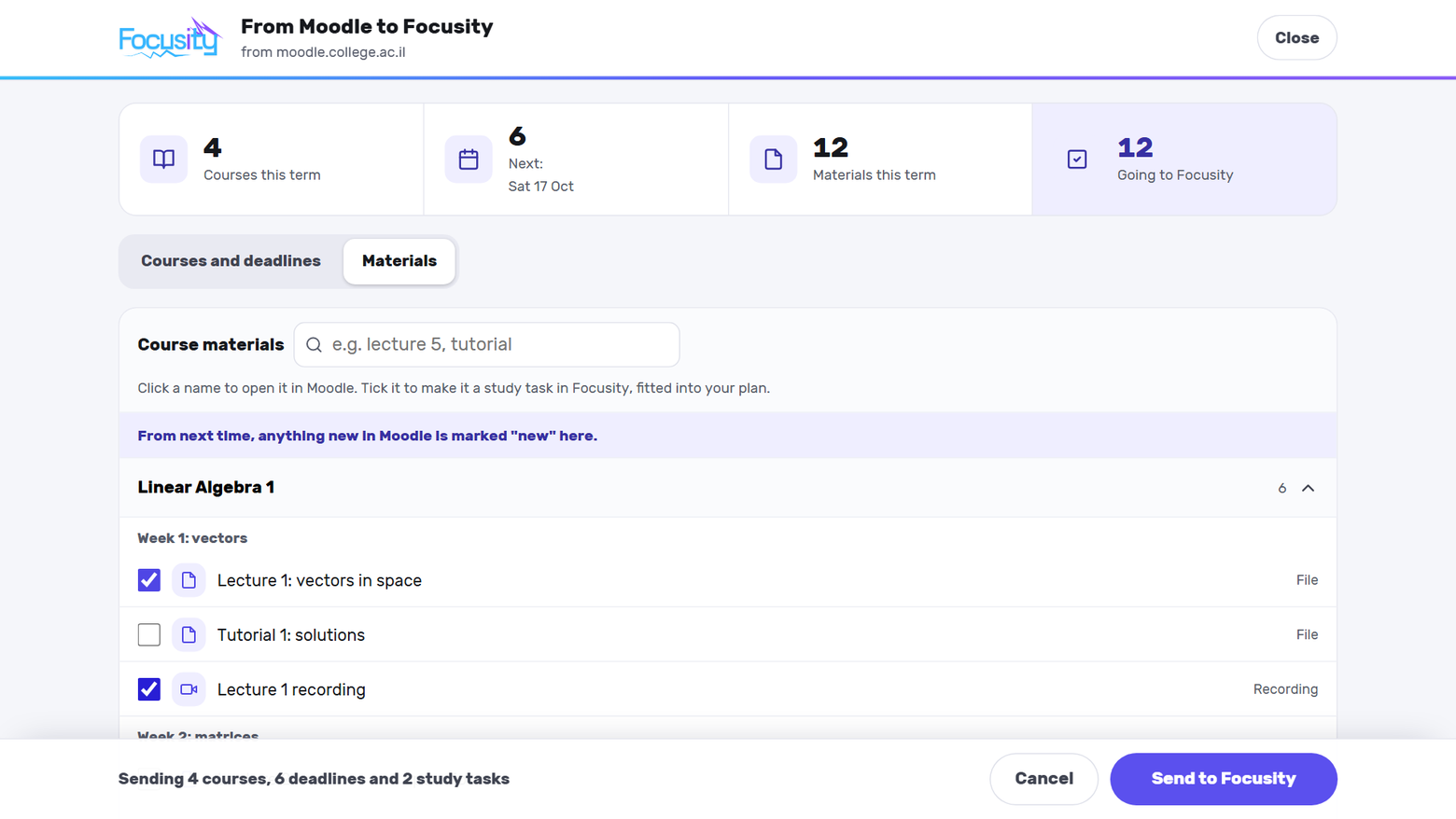
Every Moodle deadline and course file, in one click.
Drag the button to your bookmarks bar once. From then on, one click inside Moodle shows this term's deadlines and course materials, with anything new marked.
Deadlines land on your calendar, with the time
A new course file becomes a study task in one click
A task left behind doesn't disappear. It moves up.
Anything you miss — a lecture, an exercise, exam prep — moves to one catch-up board, with a free slot the algorithm has already found for it. Tap "Reschedule" and it goes back into the plan, with no hunting for a place to put it.
Items at risk are flagged automatically, including how long they have been waiting
A reschedule suggestion based on real free time in your calendar
Mark something done or watched without leaving the board
From inside the app4 items waitingThe algorithm is finding time for them
Exam in a week? The plan splits into days.
Open the exam and choose how much to study each day — by hours or by sessions. The time until the exam splits into stages: learn and review, practice exams, final review and an easy day before — and the study sessions go into your calendar without touching anything already there.
Pick day by day, or “fill all the days for me” and change only what you need
Add past exams against the clock, with time to fix your mistakes after each one
Tick off the last session and the prep task closes on its own
Pokey answers. The scan does the typing.
Two AI tools. You get up to 10 smart actions a month for free, and Premium lets you keep going without counting.
Pokey, the smart assistant
“When should I study for statistics this week?” Pokey knows your classes, exams and assignments, and answers from the free time you actually have. Ask it to do something and it prepares the change for you to approve.
Adds an assignment, exam or class from one request
Marks an assignment done or moves a study session
Nothing goes into your planner until you tap Confirm
Up to 10 smart actions a month are free, no subscription needed.
The smart scan
Snap your timetable, your exam schedule, your grade sheet or a WhatsApp message, and AI reads it and gets everything ready for you to check. Only the rows you approve go into the app.
Timetable — from a photo or a screenshot
Exam schedule — from an announcement, a notice board or a screen
Grade sheet — from a screenshot of your college’s site
A message from WhatsApp or email — an assignment, an exam or a moved class
Your first timetable scan is free; exam schedules, grade sheets and messages come with Premium.
The study planner, imports, reminders and the focus timer are open to everyone, with no time limit and no credit card. The smart extras are free up to 10 actions a month, and optional Premium opens them all the way.
Import from Moodle, Excel, PDF and Google Calendar
Unlimited automatic study planning and rescheduling
A day-by-day prep plan for every exam
Deadline alerts and the focus timer
XP, streaks and streak freezes
Up to 10 smart actions a month: a question to Pokey, a timetable scan or practice
Focusity Premium
Monthly or yearly, and the first week is free: cancel at least 24 hours before it ends and you pay nothing. After that it renews automatically until you cancel, which you can do anytime in your app store. The store shows the price in your currency.
Less typing, more practice: AI gets everything into your calendar and gives you material to study from.
Pokey, the smart assistant, unlimited: ask what to study this week in plain words, and it answers from your own planner. It can also arrange your day and add tasks, only after you approve
AI message scan: screenshot a message from WhatsApp, email or Telegram, and the assignment, exam or moved class waits for your approval. Even “tomorrow” becomes a date
Timetable, exam and grade scans: snap your timetable, exam schedule or grade sheet, then just check and approve instead of typing
Practice from past exams: with hints and full solutions, up to 200 questions a month
Flashcards and quizzes: from your course slides and notes, up to 10 sets a month
Bought inside the mobile app, on iPhone and Android.
Cancel a subscription: on iPhone, Settings → your name → Subscriptions; on Android, Google Play → Payments & subscriptions → Subscriptions; or email meir.vaknin02@gmail.com and we'll reply within 3 business days.
Not quite. A list tells you what there is. Focusity decides when to do each thing — by due date, difficulty and the hours you focus best — and warns you before it is too late.
How is Focusity different from MyStudyLife or Notion?
MyStudyLife and Notion help you organize the semester, but they leave the decision of when to study to you. Focusity schedules your study sessions into your free hours itself, around your class timetable and exam dates. MyStudyLife is more established, and Notion is more flexible for notes. We wrote an honest comparison of 8 apps.
Is this an AI guessing for me?
No. The planning engine is algorithmic, transparent and fast — not a model making guesses. You can always see why an hour was chosen, and change it by hand. Focusity Premium adds a smart AI assistant that answers questions from your own planner and only makes a change after you approve it.
How much does it cost?
The app is free, and all of the study planning in it is free — no time limit and no credit card. The smart tools are free too, up to 10 smart actions a month: a question to Pokey, a scan or a practice set. For more, there's optional Focusity Premium, a monthly or yearly subscription with a free first week. It renews automatically, you can cancel anytime in your app store, and the store shows the price in your currency.
What can I import?
Your timetable from Excel, CSV or PDF; your exam schedule from a PDF; assignments and course materials from Moodle, with the Focusity button, a permanent link or an ICS file; your grade sheet from PDF, Excel or CSV; and Google Calendar, synced both ways. With Premium you can also scan a photo of a timetable, an exam schedule or a grade sheet. Importing again never duplicates rows.
Does it work in English?
Yes. Focusity works in English and in Hebrew, with real right-to-left support in both, and you can switch language at any time in Settings.
What if my university does not use Moodle?
That is fine. Moodle is only one of the options — you can upload your timetable from Excel or PDF, your exam schedule from a PDF, and, if your university exports a calendar (an ICS file), that too.
What happens if I miss a day and break my streak?
Every 7 days in a row earns you a freeze (you can bank up to 3), and it keeps your streak on a day you miss.
Do I need to download an app?
No. Focusity works in the browser too, on a computer or a phone, with the same account. There is also an app for iPhone and Android, and on iPhone it sends reminders to your phone before classes, exams and due dates.
Does it work on Android?
Yes. The app is on Google Play, and you can also use it from your phone's browser.
What happens to my data?
It is used only to run the app. We do not sell it and we do not show ads, and you can delete your account and all of its data at any time from your Profile. The full details are in the privacy policy.
Is this the same app as "Focusity: Study Focus Timer"?
No. That is an iPad timer app by another developer, with no connection to us. This Focusity is the study planner at focusity.co.il, on iPhone, Android and the web.